




Acknowledgments: Special thanks to Andrew Brandt for contributions to this investigation and writeup.
Background
Over the past year, Huntress has tracked several significant device code phishing campaigns, including the widespread Railway-based Microsoft 365 token replay campaign we reported in March.
In mid-October, the Huntress SOC observed an attack that was unique in the lengths it went to disguise this device code flow. Threat actors interlaced the components of the device code authorization process into what appeared to be a Microsoft Teams meeting-booking process.
The attack began with a spear-phishing email impersonating a senior vice president at a real company. A link in the email led the target through several redirects to the phishing site. Rather than immediately presenting the victim with a Microsoft sign-in page, as conventional credential-phishing pages often do, the site used a plausible "Microsoft Teams Meeting Scheduler" workflow to establish more context for the attack. As the victim clicked through the site, behind the scenes it initiated a Microsoft device-code sign-in request and generated a user code; and when the target clicked "Confirm Meeting," the site quietly copied that code to the clipboard. The next step directed the target to Microsoft's legitimate device-login page, where entering the code would authorize the attacker's session.
While the Huntress SOC quickly contained this attack, it shows how threat actors are adapting device code phishing into more convincing social-engineering ploys that disguise the authorization process as an everyday task. We are releasing details below to show how attackers may go beyond a generic verification-code prompt for device code phishing, and instead turn to realistic meeting-booking flows or other lures to make the device code process feel legitimate and lower a victim's guard.
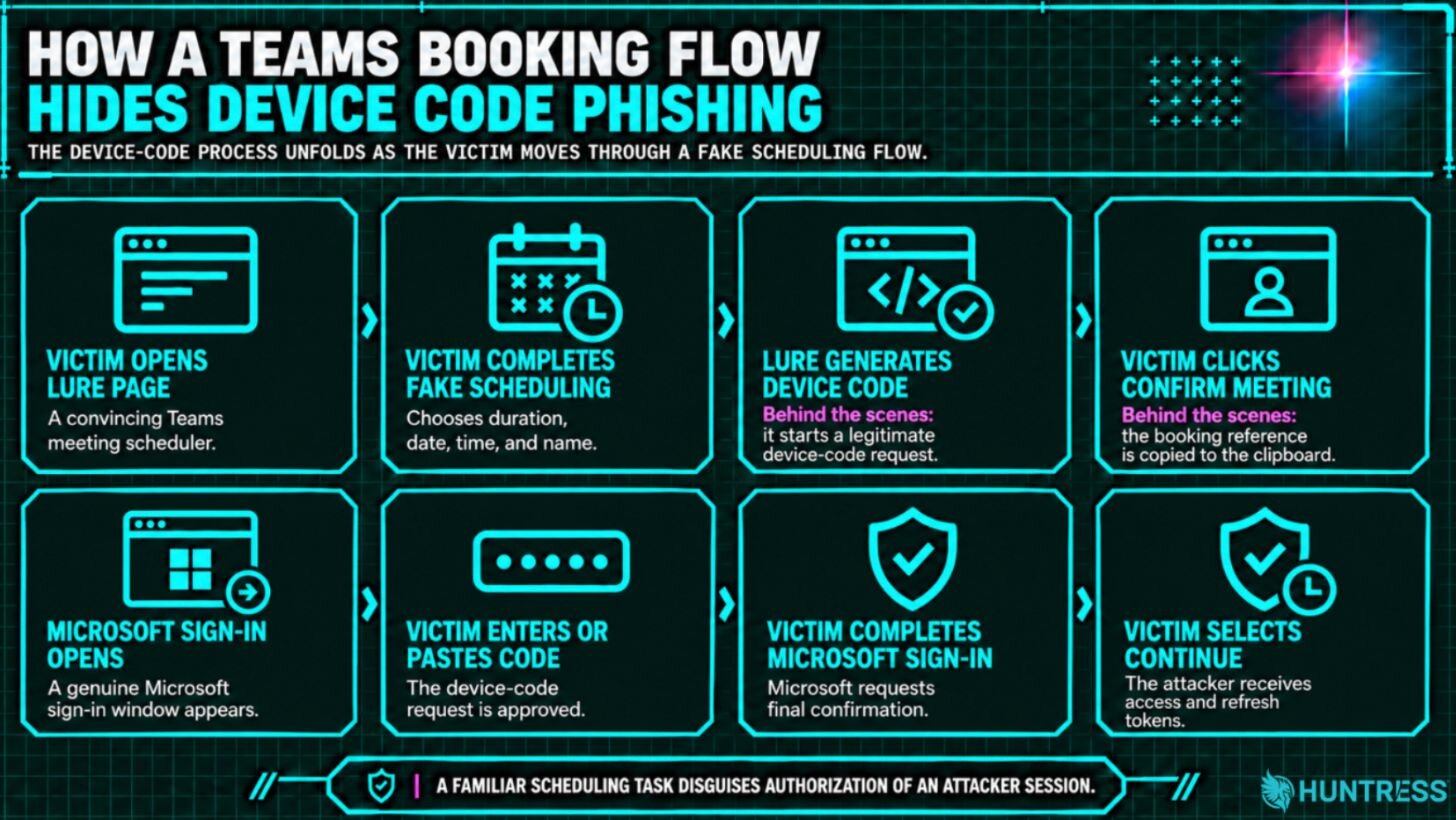
Figure 1: An overview of the attack flow
An Overview of Device Code Phishing
Before we delve into the attack, let's go over a quick primer on how attackers abuse the device code authorization flow. Device code phishing can be difficult for victims to pick up on because it involves the legitimate authorization flow and login domain: an attacker initiates a device-code sign-in request, then convinces a target to enter the resulting code on Microsoft's real device-login page (microsoft.com/devicelogin).
From the victim's perspective, the process can appear routine: they enter the code, complete multifactor authentication (MFA) if prompted, and approve the request. In doing so, however, they authorize the attacker's session and allow the attacker to obtain valuable access tokens.
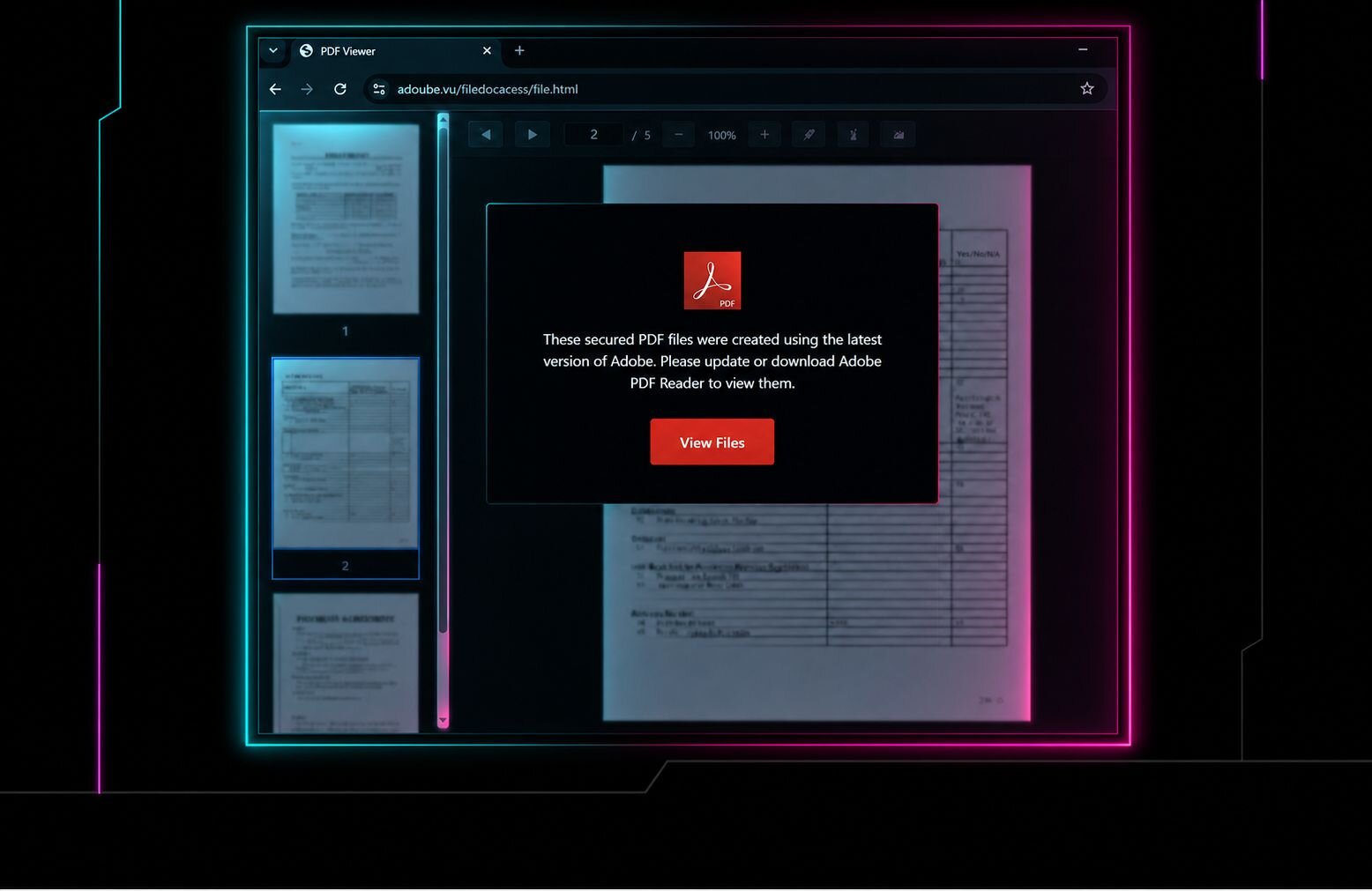
Many of the device code phishing attacks we have observed (particularly with the attacks abusing Railway) use a variation of the same lure: sending targets a PDF (whether it's an "Agreement Review" or something else) and asking them to copy a "verification code" and enter it into the legitimate Microsoft device login URL in order to access that PDF.
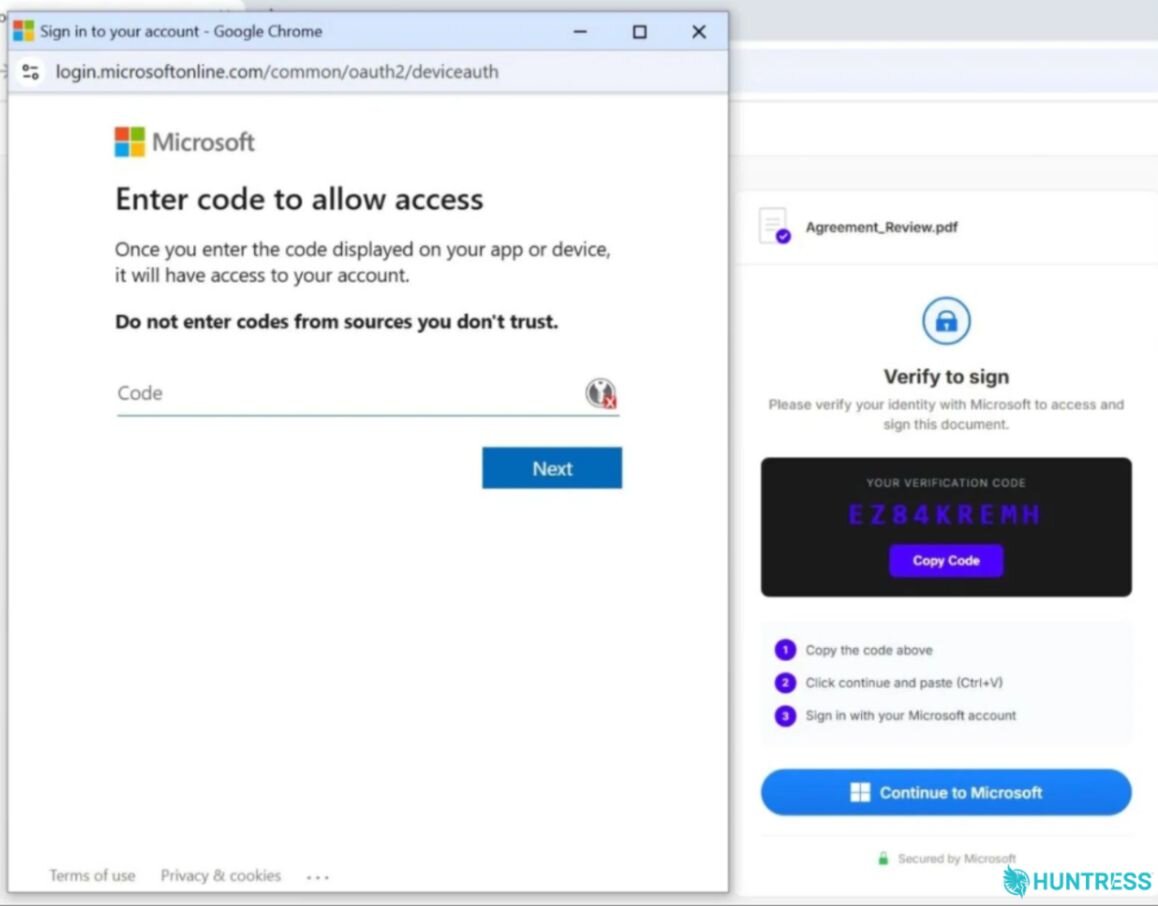
Figure 2: Previous types of device code phishing lures the Huntress SOC has seen
Attacker tradecraft
Initial lure
In mid-October, an employee at a company in the construction industry received a spear-phishing email. The message came from an email account that used a typosquatted domain to impersonate another company in the construction sector. The email purported to come from the actual senior vice president of that company.
Because the impersonated employee and company are legitimate, we have redacted the names of both in this blog; we have also reached out to the company to notify them of the fake domain.
The email contained a link that was wrapped by Microsoft safe links (nam12.safelinks.protection.outlook[.]com) and pointed to a Google short link (share[.]google/?q=UltJkMsVWI5V 9GJM1). This then redirected to www.google[.]com/share[.]google?q=UltJkMsVWI5V9GJM1 before the target was taken to an initial lure page at the typosquatted domain (see Figure 3).
These three redirects happened server-side at the same instant; because the email body contained the share.google link, as opposed to the typosquatted domain, it sidestepped URL reputation checks for email security.
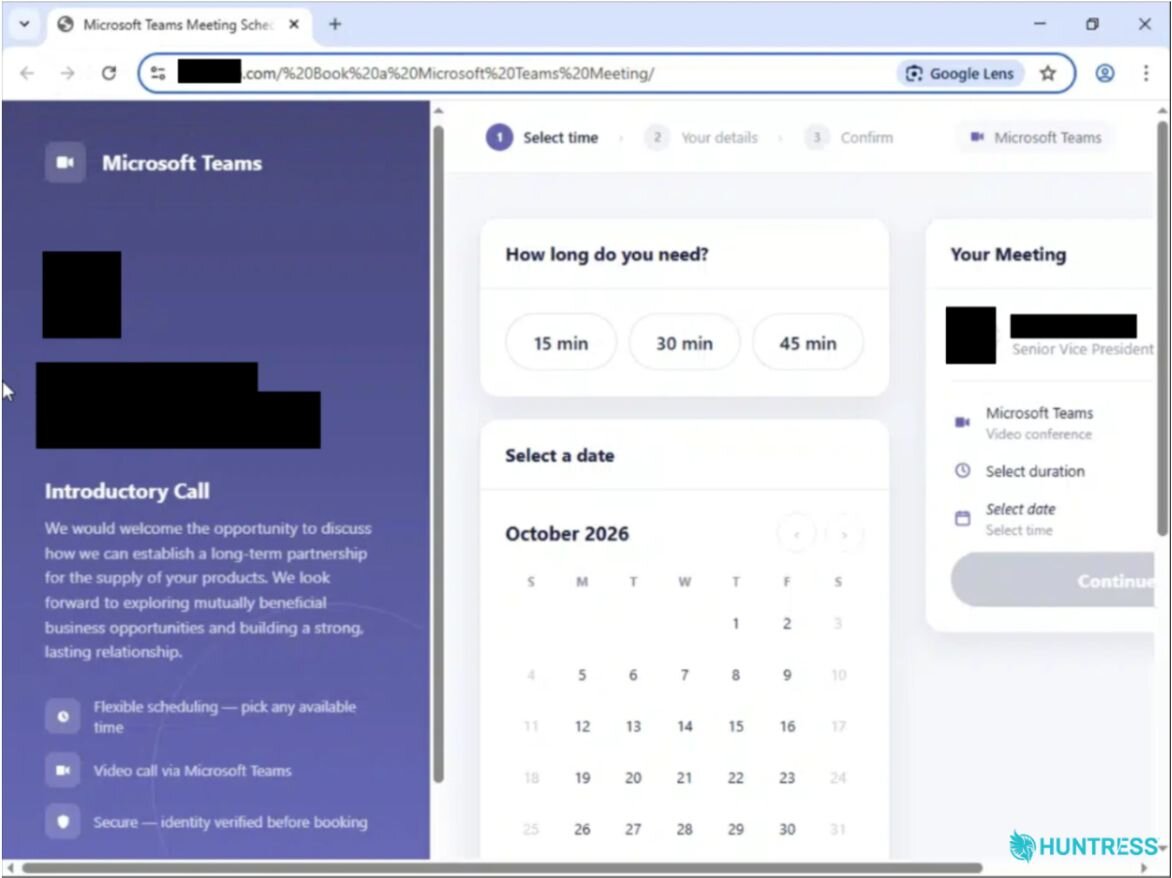
Figure 3: The initial lure link
Lure domain
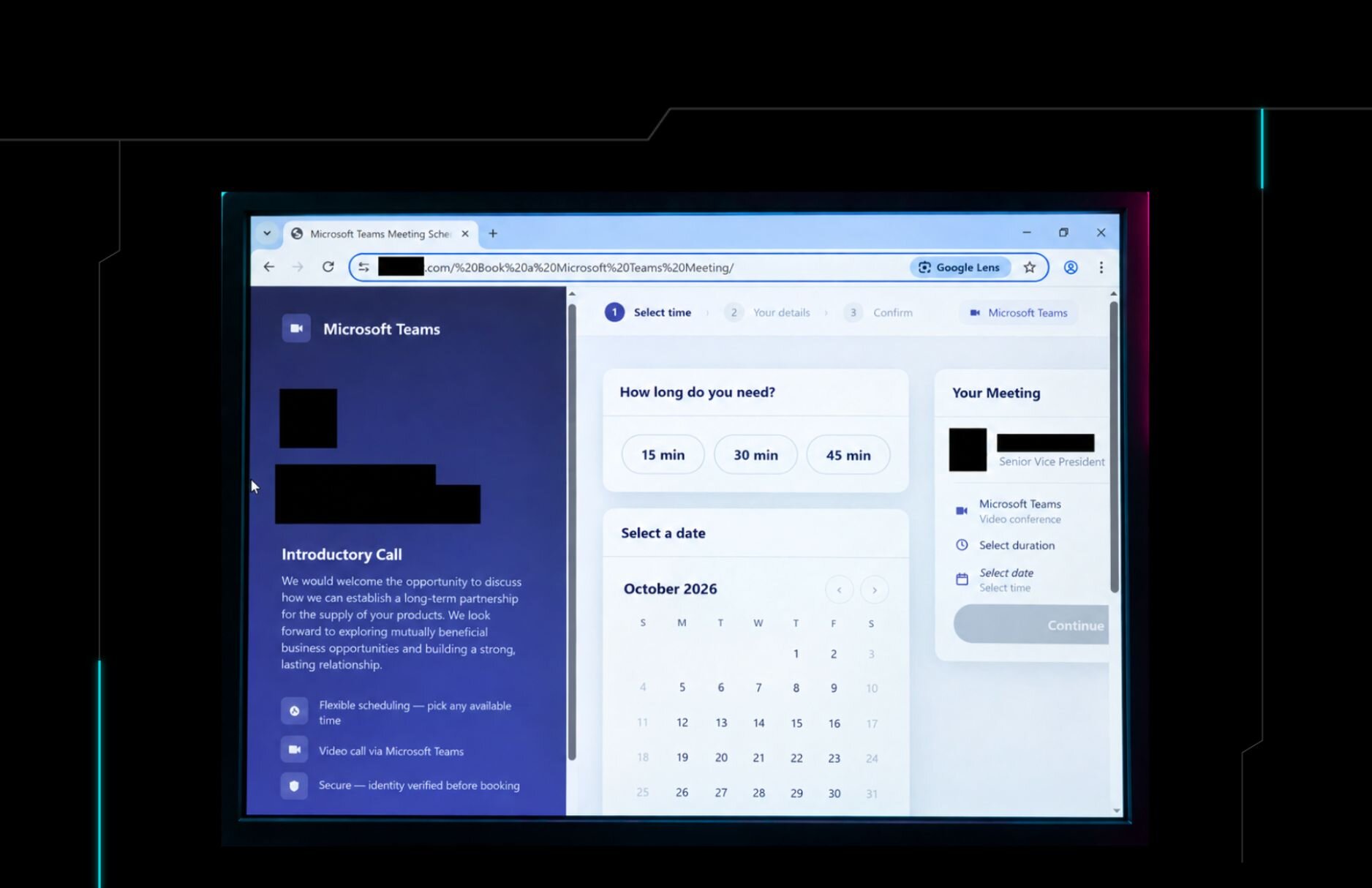
A closer inspection of the lure domain itself showed it has been set up with Zoho Mail (as indicated via its SPF record and Zoho verification TXT records). The domain shows a Microsoft Teams calendar meeting setup, including a headshot of the senior vice president, along with their name and the fake email address.
The left panel of the lure page pitches an "Introductory call" with the senior vice president about "a long-term partnership for the supply of your products." Targets are then prompted to click the date, time, and duration of their call.
The device code phishing
A closer look at the decrypted phishing kit linked to this lure page shows that when the victim fills out the duration, time, date, and name on the page, this information is not sent anywhere. The page makes no network calls until after the "Continue" button in Figure 3 is clicked.
At this point, the page resolves the visitor's country, using the site's own /cdn-cgi/trace, the backend's /api/visitor/country, or a cloudflare[.]com/cdn-cgi/trace fallback, and sends it to the backend in a request that carries no body:
POST hxxps[:]//gpimmlgration[.]com/static-export/api/device/start
X-Antibot-Token: REDACTED | X-Auth-Mode: cookie | X-WinHello: 1
X-Automatic-Target-Country: 1 | X-Visitor-Country: XX | Idempotency-Key: web-<uuid>
On the backend (not visible to the user), the attack chain here starts a Microsoft device code sign-in and returns a user_code, which is the device code.
On the victim's end, after clicking "Continue" they are taken to the "Confirm" page (seen in Figure 4), which shows a message to "Confirm Your Booking" and includes a "Booking Reference." This booking reference is the device code.
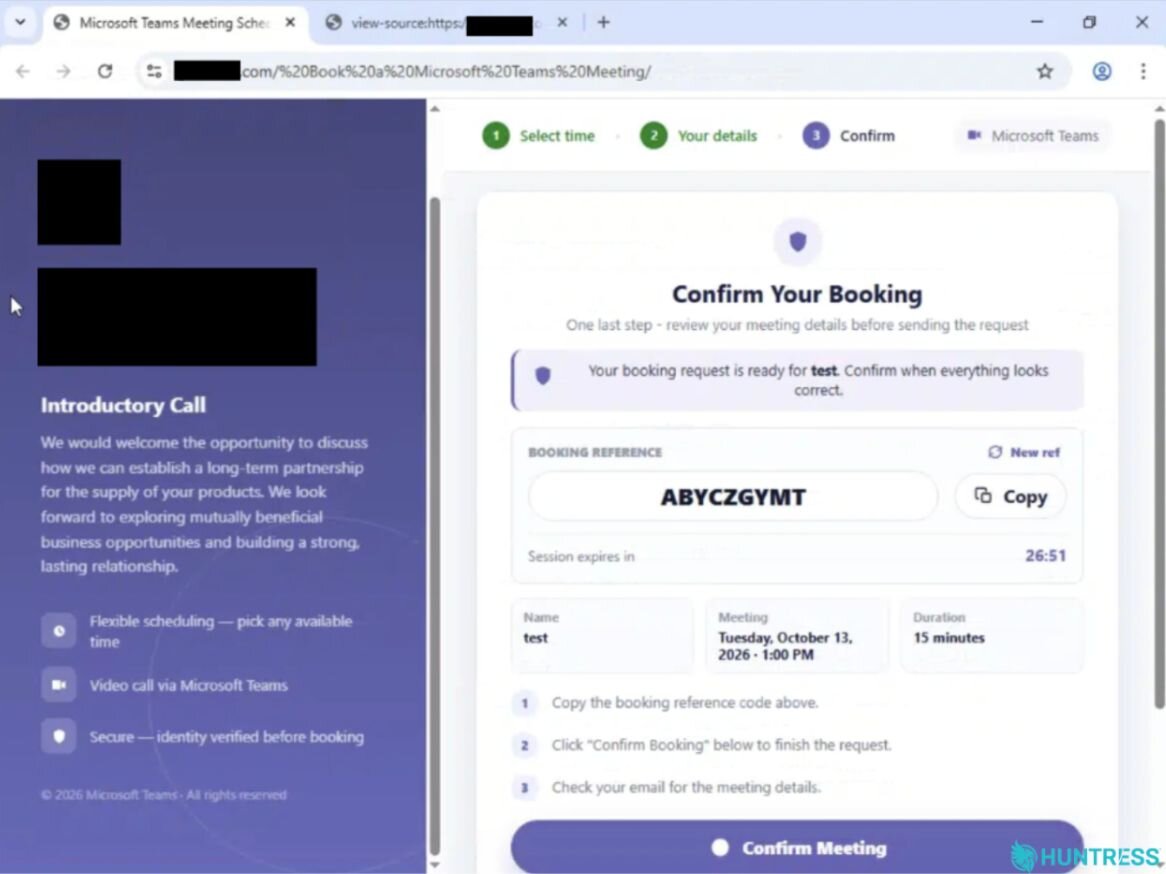
Figure 4: Lure confirmation page ("Booking Reference" is the device code)
The target is told to copy the fake booking reference before clicking a "Confirm Booking" button. The page includes a session expiration countdown to put added pressure on the victim.
When the victim clicks "Copy" or "Confirm Meeting" the code is copied to the clipboard, and the attack chain opens a popup to show Microsoft's real device sign-in page. At this point, the target is prompted to enter their code, which approves the threat actor's pending device sign-in and rounds out the device code phishing attack.
Finally, when the backend reports success, the page closes the Microsoft popup, showing the victim a "Verification complete" note and redirecting the top window to hxxps[:]//calendly[.]com/[REDACTED]/30min. This redirects the victim to what looks like a real booking page, so that they don't have any reason to think anything suspicious happened.
After the victim in the attack Huntress observed went through these steps and the attacker obtained the session token, it kicked off the Cmsi:Cmsi login to Microsoft Authentication Broker, indicating successful device code authentication. At this point, Huntress quickly identified and contained the incident, barring the attack from escalating.
The attacker's infrastructure: phishing kit
Further investigation into the attacker's infrastructure revealed that it had fallbacks built into it to keep the victim moving through the flow.
The phishing domain observed in this campaign (at the Teams booking site) showed it was a small loader, with the real phishing kit stored as AES-256-GCM ciphertext (the key and IV were sitting right next to it in the page). The browser decrypts it with a built-in WebCrypto API and writes the result over to the page. The kit then installs its configuration (a window.open hook, and two fetch hooks). Those hooks route the kit's API calls to the backend (hxxps[:]//gpimmlgration[.]com/static-export). To an email scanner or crawler that doesn't run JavaScript, the lure page is just an encrypted blob.
The decrypted kit configuration showed that it included two modes aimed at convincing the target to keep engaging with the attack:
WinHello stage: If the backend provides a mirror_url, the victim sees a pop-up designed to look like a real Microsoft window. It says: "Your sign-in was successful. To continue, we need to complete an additional verification on this device." While we can't see where mirror_url points, we can see the subsequent pop-up directs the target to take further action.
Token-mode fallback: If Microsoft returns AADSTS50076 or interaction_required, which can happen when MFA is required, the victim sees this message: "For your security, please verify your account again. A new verification code is being prepared." Behind the scenes, the attack starts a new device-code session by sending POST /api/device/start. It restarts the MFA flow and gives the victim another chance to authenticate. The victim then sees: "Verification code ready. Please complete verification using the new code shown on this page."
We also observed the Device code (Cmsi:Cmsi) login being routed through a residential callback proxy so that it looked like regular consumer traffic. Compromised consumer electronics sometimes can be abused by threat actors to turn them into what we typically refer to as "residential proxies" - a compromised consumer electronic device, like a cable router or set top box that serves the criminal underground as a way to route traffic through themselves, so the machines at either end of the connection think the traffic originates from the proxy, rather than the machine that is sending data through or receiving data from the proxy. The address in our logs points to a random home internet address that has no other malicious activity associated with it aside from being abused as a proxy, based in New Orleans.
Device code phishing disguises
Device code phishing works well for threat actors because it abuses a legitimate Microsoft authentication process. In this case, the attacker wrapped that process in a credible meeting-booking experience, used an impersonated executive and a typosquatted domain to establish trust, and wove Microsoft's real device-login page into the attack to complete the authorization.
Defenders should treat unexpected device-code prompts as suspicious, especially when they follow a link, booking request, or unexpected interaction. Part of this may include training users to stop and verify the request through known contacts before entering any code on a Microsoft sign-in page. Restrict or monitor device-code authentication where it is not required via conditional access, enable additional complex conditional access policies, enforce phishing-resistant MFA, and investigate unfamiliar OAuth and device sign-ins, especially from unmanaged devices, new regions, or residential proxy infrastructure. The most effective response combines user awareness with identity-focused detection and controls. When a routine task asks someone to copy, enter, or approve a code, defenders should ensure they understand exactly whose session they are authorizing. Following a confirmed compromise check for any rogue MFA methods, unrecognized registered devices, unauthorized app consents, suspicious mailbox rules, and suspicious outbound mail.
Indicators of Compromise (IOCs)
Item | Description |
|---|---|
| Attacker-controlled backend / phishing infrastructure. |
| Google short-link redirect used in the phishing chain. |
| Subsequent redirect before the lure page. |
| Indicates the successful device-code authentication observed in the incident. |
| Indicates automated infrastructure. Appears both in interactive and non-interactive sign-in logs. Often times programmatic user agents only appear in non-interactive sign-in logs |
MITRE ATT&CK
Tactic | Technique | Context |
|---|---|---|
Resource Development | Acquire Infrastructure: Domains (T1583.001) | Threat actor registered the malicious typosquatted domain eight days before the incident. |
Resource Development | Stage Capabilities: Link Target (T1608.005) | Threat actor staged several Microsoft Teams-themed lure directories ( |
Initial Access | Phishing: Spearphishing Link (T1566.002) | The threat actor delivered a targeted email leveraging a multi-stage redirect chain to bypass security controls, routing the initial Microsoft Safe Links-wrapped URI through a Google short link ( |
Execution | User Execution: Malicious Link (T1204.001) | The victim clicked the link and completed the booking flow, copying and entering the "Booking Reference" device code. |
Stealth | Obfuscated Files or Information: Encrypted/Encoded File (T1027.013) | Threat actor ships the phishing kit as AES-256-GCM ciphertext that is decrypted in the browser, hiding the content and backend from static scanners. |
Stealth | Valid Accounts: Cloud Accounts (T1078.004) | Threat actor uses the compromised Microsoft 365 account, which had no MFA enrolled, from a non-compliant, unmanaged device. |
Stealth | Social Engineering: Impersonation (T1684.001) | Threat actor impersonates a real executive (name, middle initial, title, headshot) and Microsoft Teams and Microsoft sign-in branding. |
Credential Access | Steal Application Access Token (T1528) | The device code flow hands the threat actor tokens for the Microsoft Authentication Broker client once the victim enters the code on Microsoft's genuine page. |
Credential Access | Steal Web Session Cookie (T1539) | The session token was captured through the relayed |
Credential Access | Adversary-in-the-Middle (T1557) | A callback proxy relayed the victim's authentication and the post-MFA |
Lateral Movement | Use Alternate Authentication Material: Web Session Cookie (T1550.004) | The captured session was replayed from attacker infrastructure; the ASN and region changed inside the same session ID. |
Command and Control | Proxy (T1090) | Threat actor routes the captured session through a residential callback proxy ( |
References
Riding the Rails: Threat Actors Abuse Railway.com PaaS as Microsoft 365 Token Attack Infrastructure: https://www.huntress.com/blog/railway-paas-m365-token-replay-campaign